Running a POS business comes with a lot of responsibility. Whether you own one POS terminal or manage several across different locations, protecting your daily collections should always be one of your top priorities. While many POS agents focus on increasing transactions, they sometimes overlook the security features already available on their terminals.
One feature that deserves more attention is the ability to disable the transfer option on your OPay POS terminal. Many business owners are unaware that this simple setting can help prevent transaction mix-ups, improve accountability, and give them greater control over how money flows through their business.
From my experience as a financial educator and business coach, I have seen cases where business owners lose money simply because employees transfer funds from the POS terminal without proper authorization. In other situations, customers mistakenly send money through transfers instead of paying directly on the terminal, creating unnecessary confusion when reconciling daily sales.
The good news is that OPay has provided a simple solution. By turning off the transfer feature, your POS terminal becomes a collection-only device, allowing customers to pay through the terminal without enabling outgoing transfers from the device itself.
Why You Should Turn Off the Transfer Feature on Your OPay POS
If you are wondering why this feature matters, think about how your business operates every day. Every transaction should be easy to track, reconcile, and verify. When transfers are enabled, there is a possibility that funds may leave the terminal without the owner’s direct approval, especially when multiple people have access to the device.
Disabling transfers helps eliminate that risk. Customers can still make payments through the POS terminal, but no one can initiate bank transfers directly from the device. This reduces the chances of unauthorized transactions and helps business owners maintain tighter financial control.
Another major advantage is improved record keeping. When all collections come through the POS terminal without outgoing transfers, it becomes much easier to reconcile daily transactions, identify discrepancies, and prepare accurate financial reports. This is especially important for businesses handling a high volume of daily payments.
A Useful Feature for Businesses with Multiple Branches
This feature becomes even more valuable if you operate more than one business location or have employees managing your POS terminals on your behalf.
Many business owners cannot be physically present at every branch every day. In such situations, having stronger control over payment activities can reduce operational risks significantly.
Related Content





By disabling transfers, every payment received remains within the business account linked to the POS terminal. Employees can continue serving customers normally, but they cannot move money out of the terminal without the owner’s approval through other authorised channels.
This creates greater accountability and reduces opportunities for financial misconduct.
Will Turning Off Transfers Affect Incoming Payments?
This is one question many merchants ask.
The answer is No.
Turning off the transfer option does not stop your OPay POS terminal from receiving payments.
Customers can still pay using their ATM cards, and businesses can continue accepting collections through the terminal without interruption.
The only difference is that the terminal will no longer allow outgoing transfer transactions.
In simple terms, your POS becomes a secure collection terminal while maintaining all its normal payment acceptance functions.
How to Turn Off the Transfer Feature on Your OPay POS Terminal
Follow these simple steps:
Step 1: Open Your OPay Business App

Log in to your OPay Business App using your registered account details. Once you are on the dashboard, tap the POS icon to view all the terminals linked to your business account.
Step 2: Select the POS Terminal

If you have multiple POS devices, select the specific terminal you want to manage. After opening the terminal details, tap More Options to access additional settings.
Step 3: Open POS Terminal Features
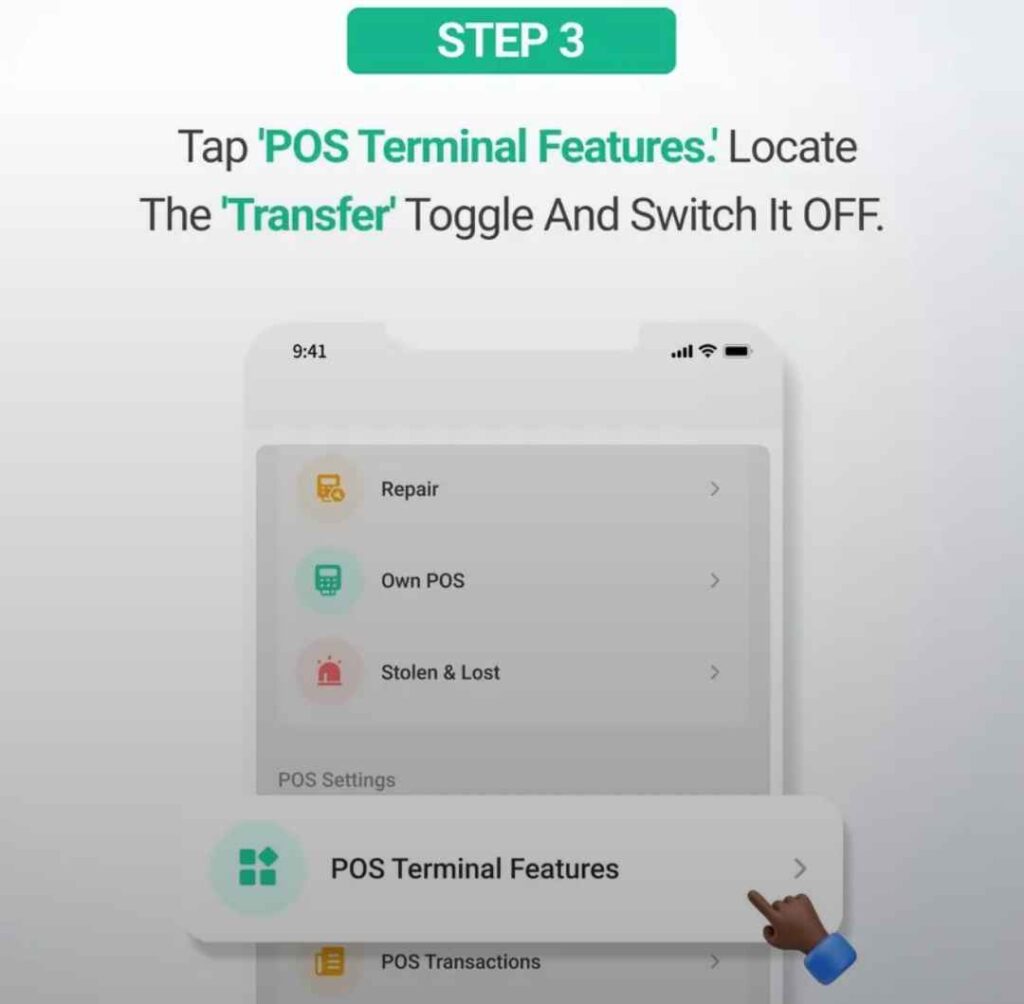
Inside the settings menu, select POS Terminal Features. Locate the option labelled Transfer. You will see a toggle button beside it.
Simply switch the toggle Off.
Step 4: Your Terminal Is Now Collection Only
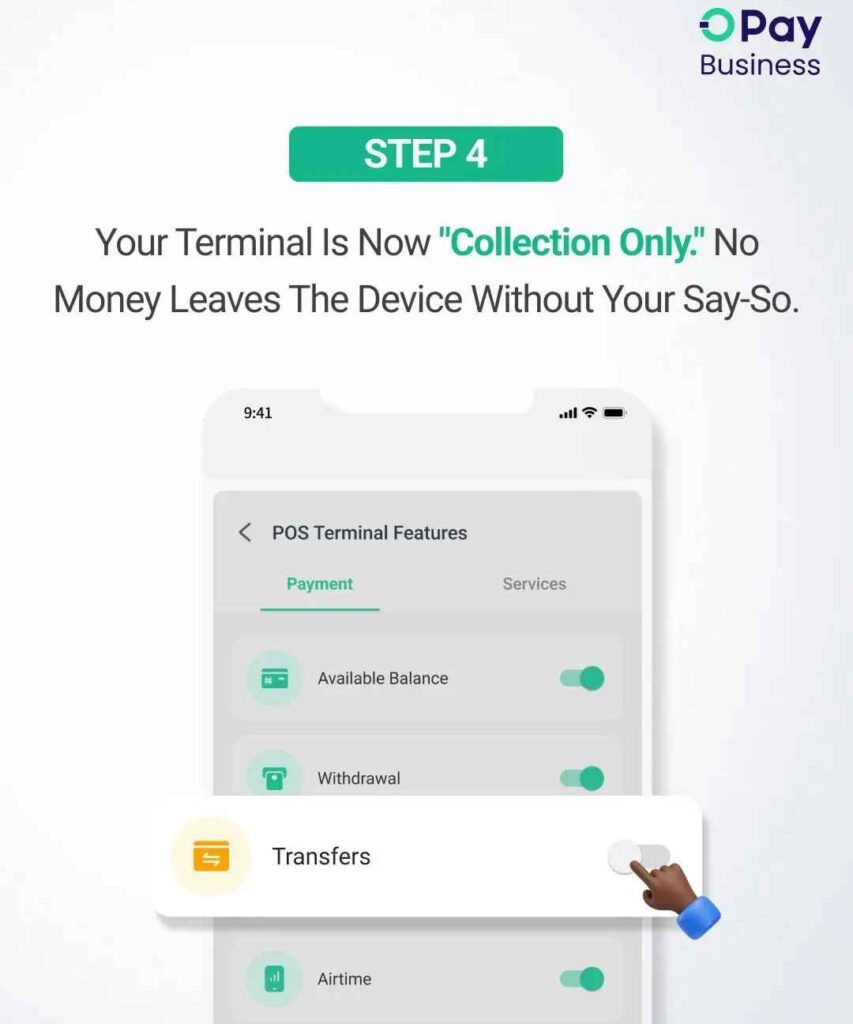
Once the transfer feature has been disabled, your OPay POS terminal will function as a collection-only terminal.
Customers can continue making payments through the terminal, but no outgoing transfers can be initiated directly from the device unless you choose to enable the feature again in the future.
Benefits of Disabling Transfers on Your OPay POS
Turning off the transfer feature offers several advantages for merchants and POS agents, including:
- Better control over business funds.
- Reduced risk of unauthorized transfers.
- Improved accountability for staff managing POS terminals.
- Cleaner transaction records for reconciliation.
- Easier financial management for businesses with multiple branches.
- Greater confidence that collections remain where they should.
Conclusion
Technology continues to make business operations easier, but business owners must also take advantage of the security features available to protect their income.
The ability to disable transfers on an OPay POS terminal may appear to be a small setting, but it can make a significant difference in preventing mistakes, improving accountability, and keeping your business finances organized.
If you manage one or several POS terminals, taking a few minutes to review your terminal settings could save you from unnecessary financial headaches in the future.
At BankiBusiness.com, we remain committed to sharing practical banking, fintech, and business guides that help Nigerian entrepreneurs make smarter financial decisions and protect their businesses.