Many people use Safebox inside the OPay app to save money and earn interest, but the most common question users ask is how to withdraw their money when they need it. This usually happens when there is an urgent expense, a change of plan, or when the savings period has ended. While Safebox is designed to encourage discipline, OPay still allows users to withdraw their funds under specific conditions.
This guide focuses strictly on how to withdraw money from Safebox in OPay, without repeating general explanations already covered in my previous post about Opay Safebox. It explains the exact steps, what happens to your money after withdrawal, how long it takes, and what to expect if you try to withdraw before maturity.
The aim is to help OPay users withdraw their Safebox funds correctly, avoid mistakes, and understand the rules that apply before confirming any withdrawal.
Can You Withdraw Money from OPay Safebox?
Yes, you can withdraw money from OPay Safebox at any time, but specific rules apply, especially when it comes to penalties.
Safebox allows users to save continuously while earning interest, with withdrawals permitted throughout the year. However, the cost of withdrawing depends on when the withdrawal is made.
Free Withdrawal Days
OPay provides four (4) official free withdrawal days each year. When you withdraw your money on any of these approved dates, no penalty is charged, and your savings, including earned interest, are moved back to your OPay wallet.
These free withdrawal days are designed to give users planned access to their savings without affecting returns.
Withdrawing Outside Free Withdrawal Days
If you withdraw money from Safebox outside the free withdrawal days, a penalty applies. This penalty is deducted from the amount saved. The exact penalty rate is shown clearly inside the Safebox section of the app before you confirm the withdrawal.
This structure encourages disciplined saving while still giving users the freedom to access their funds when necessary.
Where Your Money Goes After Withdrawal
Regardless of when you withdraw, Safebox funds do not go directly to your bank account. Once a withdrawal is completed, the money is credited back to your OPay wallet balance, where it can then be transferred, withdrawn, or used for payments.
Before confirming any Safebox withdrawal, users are strongly advised to:
- Check whether the day qualifies as a free withdrawal date
- Review the penalty notice displayed in the app
- Understand how the withdrawal will affect earned interest
This ensures there are no surprises after the transaction is completed.
Related Content





How to Withdraw Money from Safebox in OPay
Follow these steps carefully to withdraw your savings from Safebox inside the OPay app. The process is simple, but you must pay attention to the withdrawal notice shown in the app.
Step 1: Open the OPay App
Launch the OPay app on your phone and log in to your account.
Step 2: Go to the Right Section
- If you are using the normal OPay personal app, click on Finance.
- If you are using the OPay Business app, click on Savings.
Step 3: Select Safebox
From the list of savings options, tap on Safebox to open your Safebox dashboard.
Step 4: Click on Withdraw

Inside Safebox, click on Withdraw to begin the withdrawal process.
Step 5: Read the Withdrawal Warning Carefully
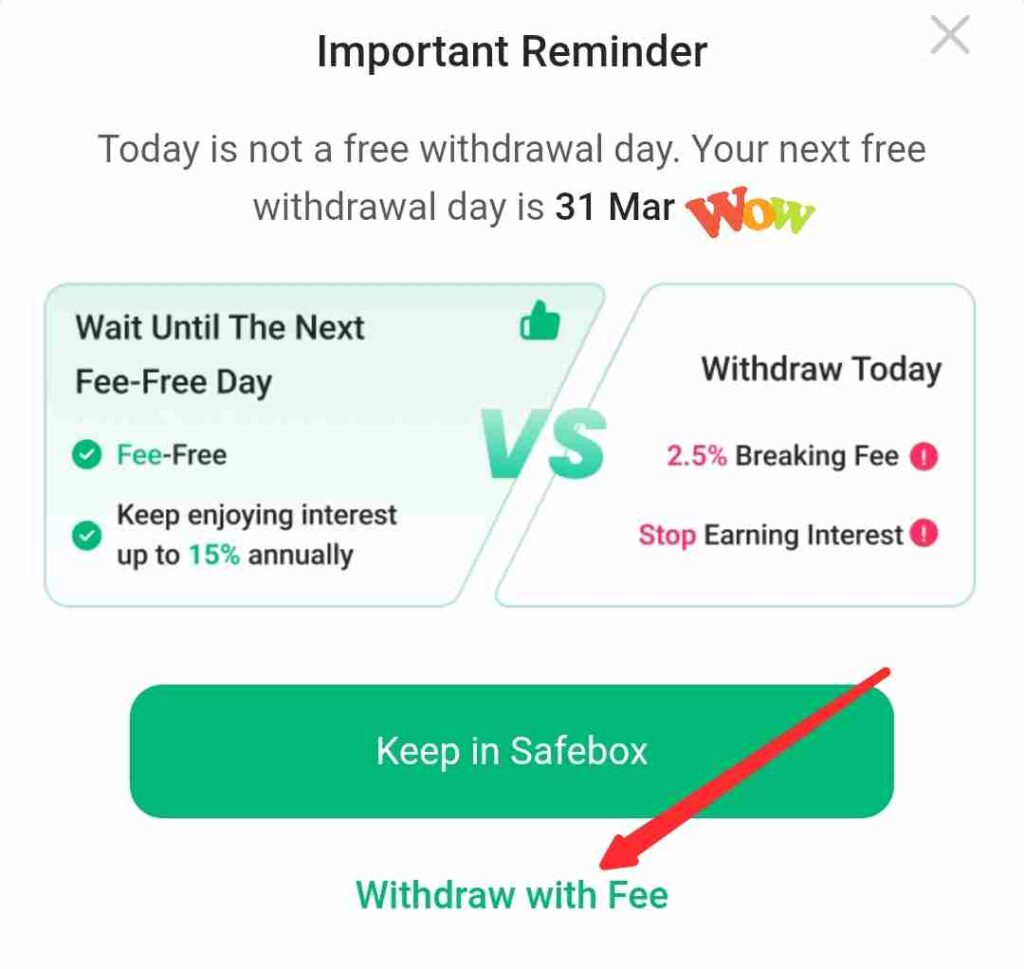
If the day you are withdrawing is not one of the free withdrawal days, a pop-up message will appear.
The message will clearly inform you that:
- The day is not a free withdrawal day
- A 2.5 per cent breaking fee will apply to the withdrawal
- The fee is charged because you are withdrawing outside the free withdrawal period
If you still want to proceed, click on Withdraw with Fee.
Step 6: Enter the Amount
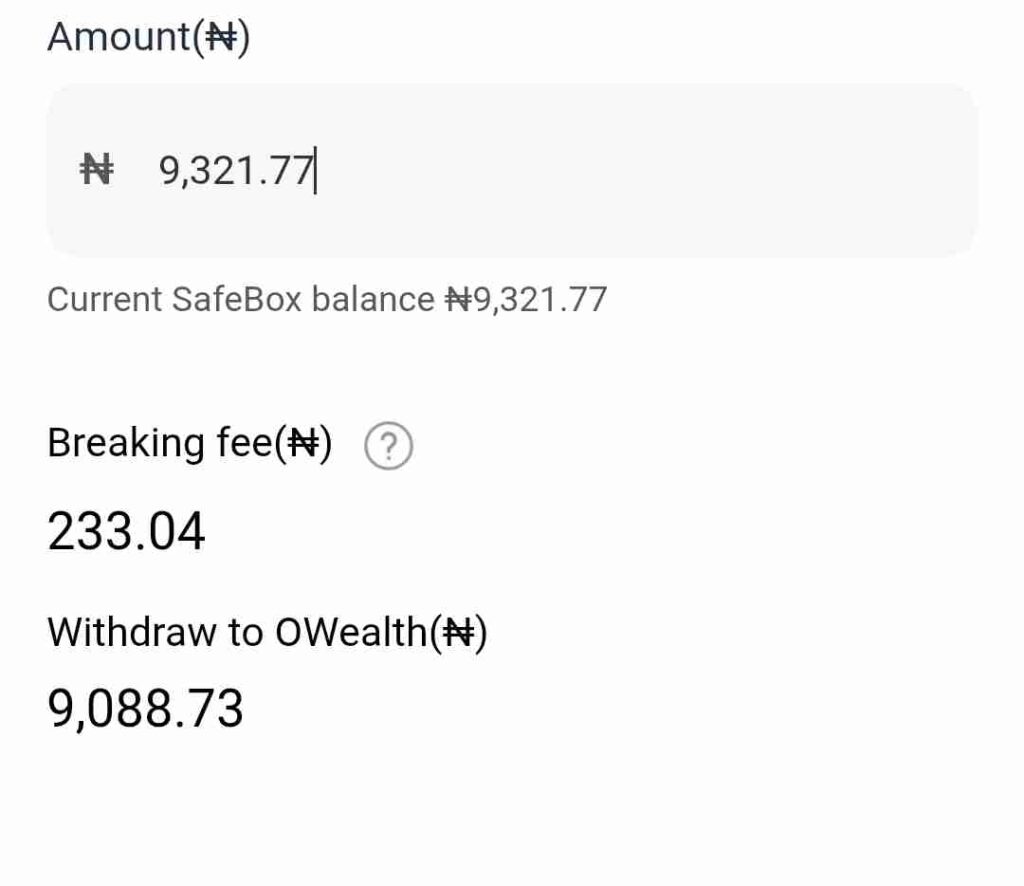
Input the amount you want to withdraw from your Safebox savings.
A summary of the transaction will pop-up, confirm and click Withdraw.
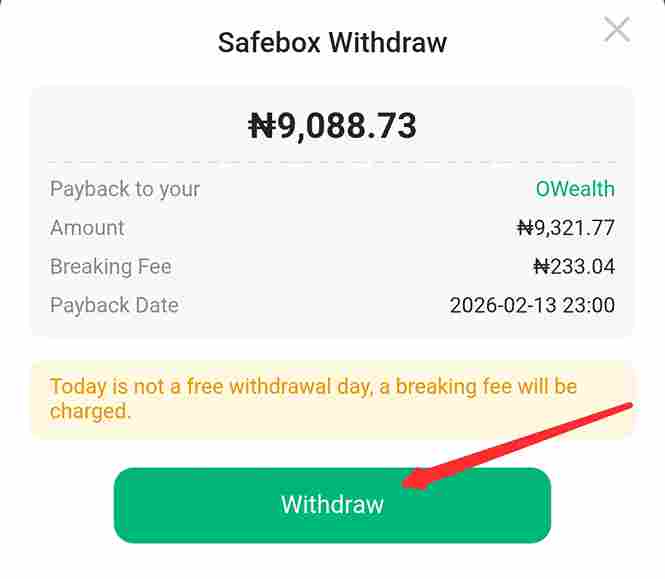
Step 7: Confirm Withdrawal
Click Withdraw, then enter your OPay transaction PIN to confirm the request.
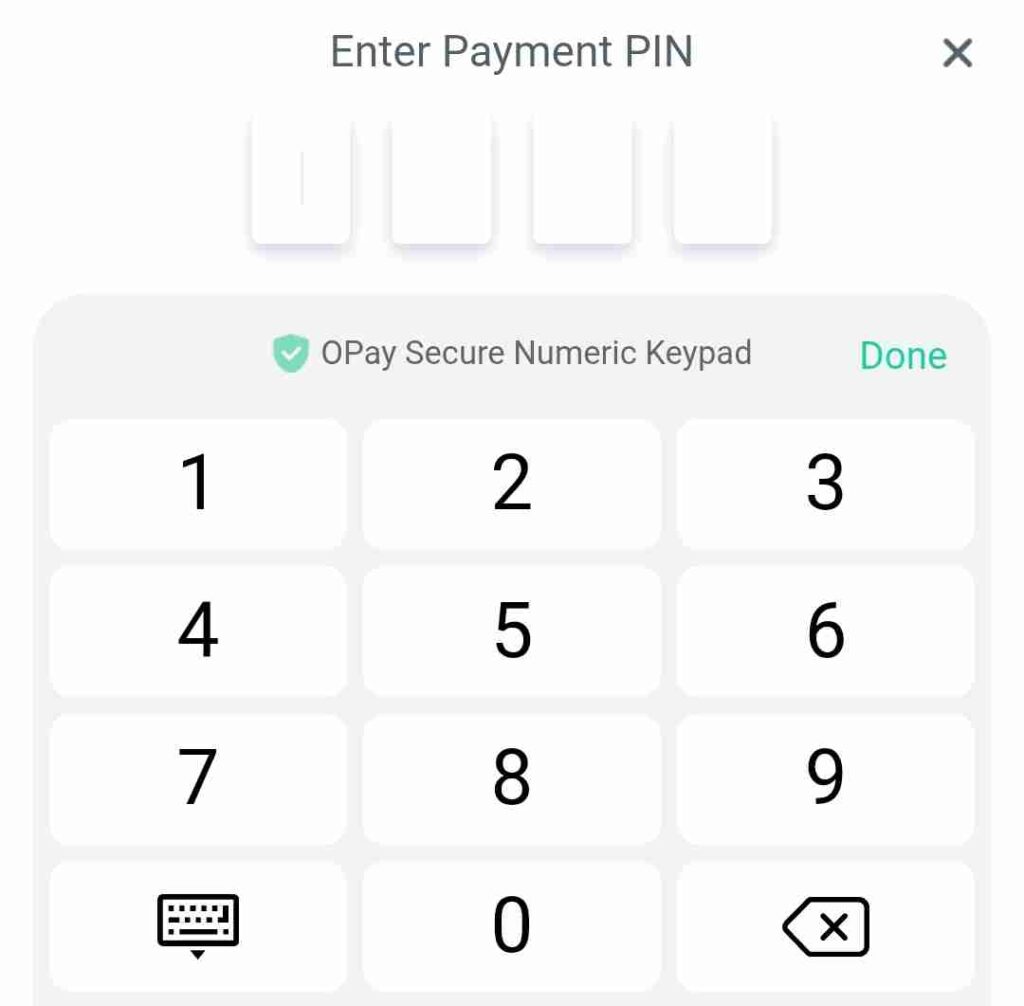
Once your PIN is confirmed, the withdrawal request is submitted successfully.
Important Note on Processing Time
Safebox withdrawals are not instant.
After completing the steps above, you will not see the money immediately in your OPay wallet. Withdrawal from Safebox takes up to 24 hours to process before the funds are credited to your wallet balance.
This delay is normal and part of how Safebox withdrawals work.
That is the correct and complete process for withdrawing money from Safebox in OPay.
What Happens If You Withdraw Before Maturity?

With Safebox in the OPay app, withdrawing before maturity does not mean your money is locked or inaccessible. However, the timing of your withdrawal determines whether a penalty applies.
Withdrawal on Official Free Withdrawal Days
OPay allows users to withdraw from Safebox without any penalty on four official free withdrawal dates each year.
If you withdraw your money on any of these approved dates: March 31, June 30, September 30 and December 31.
- No breaking fee is charged
- Your savings and earned interest are processed normally
- The full amount you withdraw is returned to your OPay wallet after processing
These free withdrawal days are provided to give users scheduled access to their savings without losing value.
Early Withdrawal Outside Free Withdrawal Days
If you withdraw your Safebox savings outside the free withdrawal dates, the withdrawal is treated as an early withdrawal. In this case:
- A 2.5 per cent breaking fee is applied
- The fee is deducted from the amount you withdraw
- The minimum breaking fee is ₦0.01, even for small withdrawals
The app will always display a clear warning before you confirm the transaction, showing that a breaking fee will apply. You must accept this notice before the withdrawal can proceed.
Key Point to Note
The breaking fee is not hidden. OPay clearly informs users before final confirmation, allowing you to decide whether to proceed immediately or wait until the next free withdrawal day.
Understanding this rule helps you plan withdrawals properly and avoid unnecessary charges when using Safebox.
Safebox Withdrawal Processing Time
After you submit a withdrawal request from Safebox in the OPay app, the money is not credited instantly to your wallet. Safebox withdrawals require processing time, and this often causes confusion for first-time users.
Once your withdrawal is confirmed with your PIN, OPay begins the processing stage. During this period:
- The money will not appear immediately in your OPay wallet balance
- The transaction status may show as processing or pending
- No further action is required from you
Safebox withdrawal typically takes up to 24 hours to complete. After processing is finished, the withdrawn amount is credited to your wallet, where it can then be transferred, withdrawn, or used for payments.
If the 24-hour period has not passed, it is normal not to see the funds yet. However, if the processing time exceeds 24 hours, users are advised to:
- Check the transaction status inside the app
- Ensure there are no account restrictions
- Contact OPay customer support if the delay continues
Conclusion
Safebox is designed to help OPay users save consistently while still allowing access to their money when needed. With Safebox, you can withdraw your savings at any time, but the timing of your withdrawal determines whether a breaking fee applies.
To avoid penalties, withdrawals should be planned around the four official free withdrawal days each year. When withdrawals are made outside these dates, a 2.5 per cent breaking fee is charged, with a minimum deduction of ₦0.01. All Safebox withdrawals take up to 24 hours to process, and the money is credited to your OPay wallet after processing is completed.
Understanding these rules helps you withdraw correctly, avoid unnecessary charges, and manage your savings better. For users who plan their withdrawals carefully, Safebox remains a practical savings option within the OPay app.